GUIDE
Starting a Shopify shop: preparation checklist
Shop design is easier to plan once your product range and order process are clear. If you leave images, variants and shipping rules until just before launch, finished pages often need changing again. This checklist helps you make the key decisions before implementation.
1. Start with a manageable product range
Which products should actually be available to order at launch? Separate available items from ideas for later. A small, fully documented selection is easier to check than a large catalogue with missing details.
Start with your customers’ questions: do they search by product type, intended use or size? These questions help define your categories. First, describe how someone unfamiliar with your range should find a suitable product. Your internal stock label is not always a clear category name.
2. Gather complete product data in one place
Create one shared table for names, descriptions, prices, images, variants, item numbers and stock levels. Name image files so each can be clearly matched to its product. Weight and dimensions may also matter for shipping.
A fictional example: a T-shirt comes in two colours and three sizes, giving six possible combinations. For each combination you actually offer, record availability, its item number and the corresponding image. This helps you spot missing details for “Blue / M”, for example, before import.
Read descriptions from the customer’s perspective: what is included, what material is the item made from and what is it suitable for? A photograph cannot replace measurements. Also decide who will manage future price and stock changes.
Product images and variants at Celovia
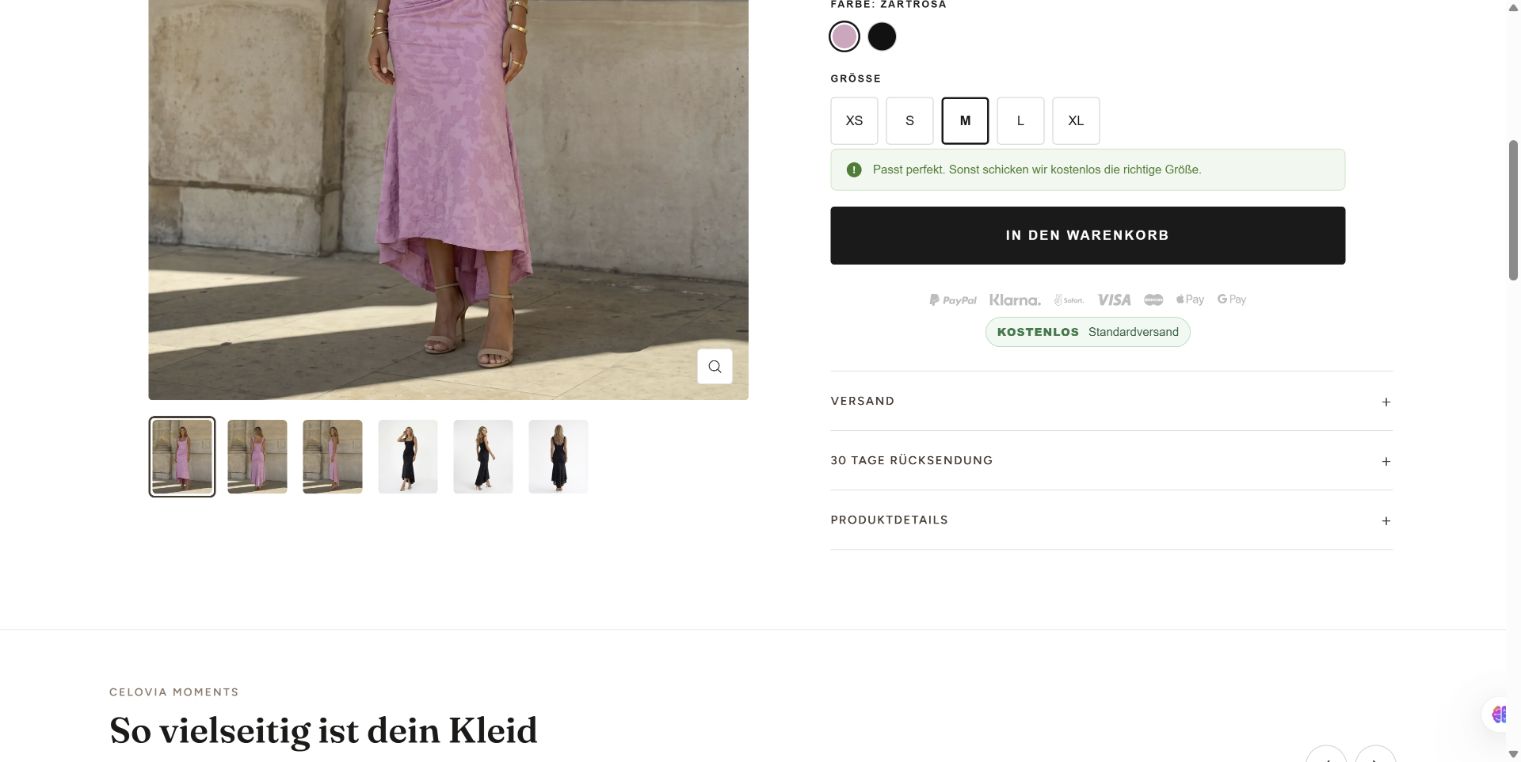
A view from our own Celovia shop. The screenshot shows product selection at the time it was captured; offers and delivery information may change.
- Image gallery on the left: Multiple views help shoppers understand the cut and details. Match images clearly to the product and, where relevant, its colour variant.
- Options on the right: Colour and size can be selected separately; the selected size has a border. Check the image, price and availability for each combination.
- Shopping cart: The next step is presented as a button. Test whether the selected variant then appears in the cart with the correct quantity.
3. Think through delivery and payment as a customer
Decide which countries you will ship to at launch and how delivery charges will be calculated. What happens with multiple items, heavy products or an order below a possible free-shipping threshold? Write these cases down before configuring the rules.
Align payment methods, delivery information and the handling of enquiries with your actual operation. Who processes an order, who ships it and who answers customers? The shop needs to fit this process. Have the legal and tax information required for your business model checked by qualified professionals.
4. Separate initial and ongoing costs
Depending on scope, the project includes not just design but data preparation, copy, integrations and handover. Ask for these services to be listed separately in the quote. An existing product list only saves work if it is complete and usable.
Also list ongoing costs: your Shopify plan, any paid apps, payment processing and agreed support. Check whether themes and extensions incur one-off or recurring charges. Compare current prices and contract terms directly with each provider.
An app should perform a specific task. For each proposed addition, ask: do we need this feature at launch, or can we add it once a real need arises?
5. Run through a complete order
Check the journey from product selection to confirmation on a phone and a computer. A good-looking product page is not enough if the desired variant cannot be selected or shipping charges come as a surprise.
Shopify describes test orders as a way to check checkout, shipping, stock and notifications, among other things. Test methods depend on the payment provider. Customers cannot place regular orders through a provider while it is in test mode. Turn test mode off before launch. The official instructions are linked below.
- Can the correct variant be selected and added to the cart?
- Are the product price, quantity and shipping charges clear?
- Are available and unavailable products handled correctly?
- Do the intended delivery countries and shipping rules work?
- Does the test customer receive the order confirmation?
- Can your team find and process the order?
- Are test mode and any access restrictions disabled before sales start?
6. Agree maintenance and responsibilities before launch
Ask to be shown how to edit a product, replace an image, process an order and correct stock levels. Check access using your own account. Agree who to contact if something goes wrong and which support is included in the price.
For an initial project discussion, bring a small selection of products with complete data, your intended delivery countries and a list of required integrations. This makes it easier to discuss what is essential at launch and what can follow later.